It is not clear from the DOORS docs how I can create a library of functions that I can then call from Layout DXL. For example several of my Layout DXL attributes use the same subroutines, right now I have to copy them between attributes, this is error prone and if I remove a Layout DXL by accident I loose the associated code so I can't go back later, "I had that subroutine in this view, oh wait, I removed the attribute". Plus if I improve the subroutine in one DXL attribute I have to remember to copy it to another view.
So from a Layout DXL attribute DXL editor window i would like to be able to do something like "import <my lib.dxl>" and if this lib defines 5 functions, I could call any of them from that attribute's DXL. BTW, our DOORS project that would use such "custom DXL library" is used by several people so the file can't reside on local host although worse case scenario I could send the library file to colleagues.
Any help would be greatly appreciated!
Schollii - Sat Dec 24 10:09:27 EST 2016
Re: Re-use DXL across views and Layout DXL
Mathias Mamsch - Tue Dec 27 06:23:28 EST 2016
You should take some serious time to study the DXL manual, this forum and the many many DXL resources that are out there (smartdxl, etc.). The statement you are looking for is "include" look in the DXL manual for details. Regards, Mathias
Re: Re-use DXL across views and Layout DXL
Schollii - Fri Jan 20 16:25:39 EST 2017
Mathias Mamsch - Tue Dec 27 06:23:28 EST 2016
You should take some serious time to study the DXL manual, this forum and the many many DXL resources that are out there (smartdxl, etc.). The statement you are looking for is "include" look in the DXL manual for details. Regards, Mathias
Can't find anything: I open DOORS, click Help, click DXL Reference Manual, the DXL ref appears. A search in Index for "include" yields zippo. In the Search tab, include gets 27 hits and none of them cover an "include" command:

If you are talking about "#include", putting this in Search tab produces zippo, can you point to where this is discussed in DXL ref man?
Some examples I've found on the web:
#include <c:\Folder\SubFolder\LibraryDXL.inc>
#include "c:\Folder\SubFolder\LibraryDXL.inc"
#include <\\sharename\path\subdir\include_file.dxl>
The only way this would work across a team of people is if each member has access to that network share when they open their DOORS, seems risky and a maintenance nightmare if the share or path gets renamed or the subdir gets moved to a different location by someone who forgets that it *contains* files that are referenced by a DOORS project. In my OP I intended to say "in DOORS project space" so the #include would point to a DXL file stored *inside* the DOORS database for the project so you could just write
#include <my_project\\include_file.dxl>
DOORS supports the notion of folders but this doesn't work.
Re: Re-use DXL across views and Layout DXL
7XUT_Antonio_Norkus - Fri Jan 20 17:47:22 EST 2017
Schollii - Fri Jan 20 16:25:39 EST 2017
Can't find anything: I open DOORS, click Help, click DXL Reference Manual, the DXL ref appears. A search in Index for "include" yields zippo. In the Search tab, include gets 27 hits and none of them cover an "include" command:
If you are talking about "#include", putting this in Search tab produces zippo, can you point to where this is discussed in DXL ref man?
Some examples I've found on the web:
#include <c:\Folder\SubFolder\LibraryDXL.inc>
#include "c:\Folder\SubFolder\LibraryDXL.inc"
#include <\\sharename\path\subdir\include_file.dxl>
The only way this would work across a team of people is if each member has access to that network share when they open their DOORS, seems risky and a maintenance nightmare if the share or path gets renamed or the subdir gets moved to a different location by someone who forgets that it *contains* files that are referenced by a DOORS project. In my OP I intended to say "in DOORS project space" so the #include would point to a DXL file stored *inside* the DOORS database for the project so you could just write
#include <my_project\\include_file.dxl>
DOORS supports the notion of folders but this doesn't work.
The only way this would work across a team of people is if each member has access to that network share when they open their DOORS, seems risky
Most organisations accept and mitigate for this risk...
Re: Re-use DXL across views and Layout DXL
Mathias Mamsch - Sat Jan 21 05:42:58 EST 2017
Schollii - Fri Jan 20 16:25:39 EST 2017
Can't find anything: I open DOORS, click Help, click DXL Reference Manual, the DXL ref appears. A search in Index for "include" yields zippo. In the Search tab, include gets 27 hits and none of them cover an "include" command:
If you are talking about "#include", putting this in Search tab produces zippo, can you point to where this is discussed in DXL ref man?
Some examples I've found on the web:
#include <c:\Folder\SubFolder\LibraryDXL.inc>
#include "c:\Folder\SubFolder\LibraryDXL.inc"
#include <\\sharename\path\subdir\include_file.dxl>
The only way this would work across a team of people is if each member has access to that network share when they open their DOORS, seems risky and a maintenance nightmare if the share or path gets renamed or the subdir gets moved to a different location by someone who forgets that it *contains* files that are referenced by a DOORS project. In my OP I intended to say "in DOORS project space" so the #include would point to a DXL file stored *inside* the DOORS database for the project so you could just write
#include <my_project\\include_file.dxl>
DOORS supports the notion of folders but this doesn't work.
Okay - sorry for my RTFM answer - this topic seems so obvious while its not.
1. When you issue an include statement with a relative path (i.e. not absolute), DOORS will search
- the current directory for the relative path (i.e. the path where DOORS client was started from
- The lib folder of the DOORS client
- The PROJECTADDINS, ADDINS, LAYOUTADDINS, ... locations (note: you can define those by 1. command line parameter, 2. environment variable, 3. local machine registry 4. user registry)
2. When DXL security is enabled (see database properties), DOORS will omit the search the above and only look for the path defined in the database (but still search the lib folder i think).
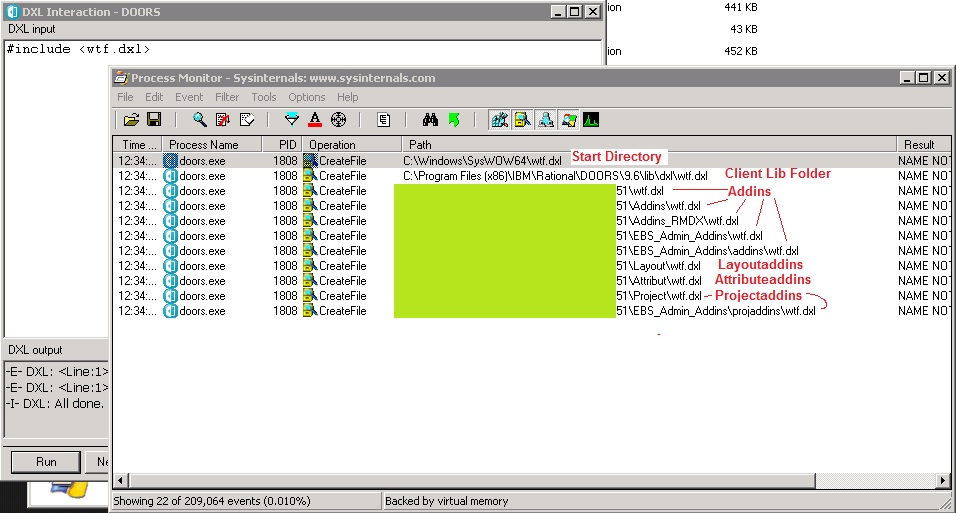
Tracking down include problems can be hard. Easiest way to see whats going on, is to use "Process Monitor" from sysinternals and do an "include <wtf.dxl>", then look inside the logs for "wtf.dxl". You will see which locations the DOORS client tried to open.
3. Network shares are as far as I know the most common solution to a globally available scripts repository for a team. Combined with DXL security, they provide a good way for the administrator to manage the scripts repository. To prevent modification my other users simply allow others only read access.
The drawback is that network shares can be very slow and loading lots of DXL scripts can produce a massive slowdown (when opening a module, when the client creates the user menus). In this case people have deployed DXL scripts to the client PCs using standard software deployment tools, writing the corresponding registry keys and putting the files to a read only location on the harddrives. This massively decreases loading times.
4. The location inside the DXL reference manual is "Lexical conventions / File inclusion" though the information there is probably useless. When starting up with DXL you should really read the Chapter 1 of the DXL manual "Introduction", especially the subchapters "Language fundamentals" and "Lexical conventions" ...
Hope this helps, regards, Mathias
Re: Re-use DXL across views and Layout DXL
Schollii - Sun Jan 22 00:00:27 EST 2017
Mathias Mamsch - Sat Jan 21 05:42:58 EST 2017
Okay - sorry for my RTFM answer - this topic seems so obvious while its not.
1. When you issue an include statement with a relative path (i.e. not absolute), DOORS will search
- the current directory for the relative path (i.e. the path where DOORS client was started from
- The lib folder of the DOORS client
- The PROJECTADDINS, ADDINS, LAYOUTADDINS, ... locations (note: you can define those by 1. command line parameter, 2. environment variable, 3. local machine registry 4. user registry)
2. When DXL security is enabled (see database properties), DOORS will omit the search the above and only look for the path defined in the database (but still search the lib folder i think).
Tracking down include problems can be hard. Easiest way to see whats going on, is to use "Process Monitor" from sysinternals and do an "include <wtf.dxl>", then look inside the logs for "wtf.dxl". You will see which locations the DOORS client tried to open.
3. Network shares are as far as I know the most common solution to a globally available scripts repository for a team. Combined with DXL security, they provide a good way for the administrator to manage the scripts repository. To prevent modification my other users simply allow others only read access.
The drawback is that network shares can be very slow and loading lots of DXL scripts can produce a massive slowdown (when opening a module, when the client creates the user menus). In this case people have deployed DXL scripts to the client PCs using standard software deployment tools, writing the corresponding registry keys and putting the files to a read only location on the harddrives. This massively decreases loading times.
4. The location inside the DXL reference manual is "Lexical conventions / File inclusion" though the information there is probably useless. When starting up with DXL you should really read the Chapter 1 of the DXL manual "Introduction", especially the subchapters "Language fundamentals" and "Lexical conventions" ...
Hope this helps, regards, Mathias
Thank you, very much appreciated! One clarification though, you say:
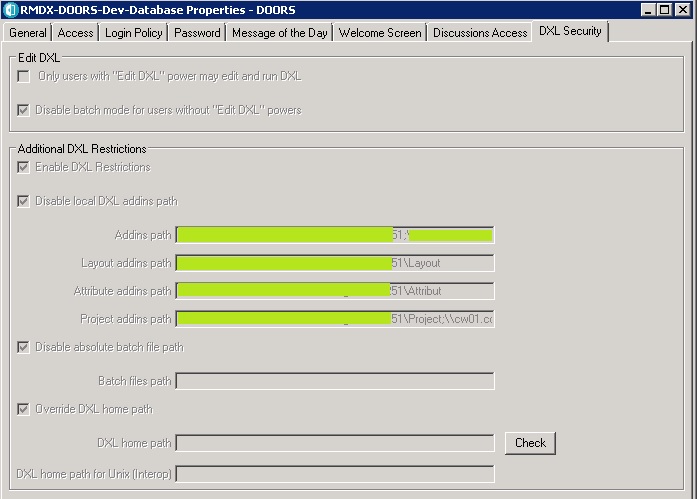
2. When DXL security is enabled (see database properties), DOORS will omit the search the above and only look for the path defined in the database
Can you clarify "only look for the path defined in the database"?
Re: Re-use DXL across views and Layout DXL
Mathias Mamsch - Sun Jan 22 06:58:44 EST 2017
Schollii - Sun Jan 22 00:00:27 EST 2017
Thank you, very much appreciated! One clarification though, you say:
2. When DXL security is enabled (see database properties), DOORS will omit the search the above and only look for the path defined in the database
Can you clarify "only look for the path defined in the database"?
Sometimes a picture tells more than a thousand words:
Regards, Mathias
Re: Re-use DXL across views and Layout DXL
smarti.sj - Mon Jan 23 08:53:55 EST 2017
Mathias Mamsch - Sun Jan 22 06:58:44 EST 2017
Sometimes a picture tells more than a thousand words:
Regards, Mathias
You can also supply the addins/project addins/layout/attr dxls paths using the under the Additional DXL restrictions GUI above. This will override all the others (1-4 in Mathias' list), I believe. If the server moves you only have one place to update it (LOVE IT). Use a ";" to delimit multiple paths.
Re: Re-use DXL across views and Layout DXL
Schollii - Tue Jan 24 15:48:27 EST 2017
Thanks for everyone's input!